How to: Enable the Administrator account in Windows

To enable the Administrator account in Windows:

  1. Open up an elevated command prompt. (If you do not know what this is, you should not be even thinking of enabling the Administrator account.)

  2. Type the following command:

    net user administrator /active:yes

How to: Disable the administrative shares in Windows

To disable the administrative shares in Windows, (default shares like C$, ADMIN$, etc.) follow these steps:

  1. Run the Registry Editor and go to the following key:

    HKEY\_LOCAL\_MACHINE\SYSTEM\CurrentControlSet \Services\LanmanServer\Parameters

  2. Create a new DWORD, name it AutoShareWks, and leave the default value of 0.

  3. Reboot Windows.

This will disable things like C$ and ADMIN$.

I am not sure how to also delete print$ and IPC$. (net share ipc$ /delete appears to work temporarily, but the share automagically re-appears after the next reboot.)

Solved: Windows: WiFi connect immediately after boot and before logon

In order to have your windows computer connect to your favorite WiFi access point immediately after booting, (without you having to first login to your computer,) follow these simple steps:

  1. First of all, make sure that this computer has previously connected to the WiFi spot of interest. (This is necessary, because a so-called wireless profile is created as a result of this manual process.)

  2. Run cmd.exe and issue the following command:

    Read more »

Solved: cannot eject USB device: "This device is currently in use-"

Millions of people all over the planet continuously have this problem: they try to eject their USB drive so as to avoid data loss, but windows does not allow them. Which is very frustrating, because whatever reasons windows thinks it has for not allowing the removal should have lower priority than the user's explicitly stated direct wish to remove the damned thing!

Anyway, suggestions for solutions abound on the interwebz, but they are mostly misguided and ineffective. Here are some that I found with a quick search:

Read more »

Solved: The network folder specified is currently mapped using a different user name and password

So, I am on computer A, trying to map a local drive to a shared folder of computer B, and Windows gives me this message: "The network folder specified is currently mapped using a different user name and password".

Microsoft supposedly addresses this issue here: https://support.microsoft.com/en-us/kb/938120 and concludes that it is so by design.

Bullshit. They are missing the point. The error message is wrong. The network folder specified is not currently mapped using a different user name and password. Instead, what is happening, is that another folder of the same computer B is already mapped on computer A using a different user name and password.

Read more »
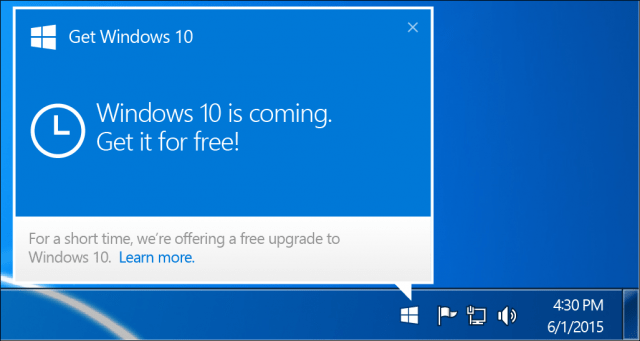
The GWX (Get Windows 10) KB3035583 trojan horse

So, Microsoft has pushed this trojan horse to every single user of Windows on the planet. It displays a Windows 10 logo on the taskbar, and it is basically telling you that not only you will get Windows 10 as soon as it comes out, but you should right now begin acting as if you are looking forward to it. Because, you know, you are their biatch.

Read more »